How to make a product unboxing video for your shop
An unboxing video answers the question every online buyer has: what will actually arrive at my door? For a small shop it builds trust better than any claim, because buyers see the real packaging, the real product and how carefully it is packed. Here is how to plan, film and edit one with just a phone and Mshopi.
Why unboxing videos sell
Photos show a product at its best; an unboxing shows the whole experience. Buyers see the parcel, the protective packing, the product coming out of the box and every accessory included. That removes doubt ("Will it arrive broken?", "Is the charger included?") and makes your shop feel real and careful. Unboxings also work as content: people enjoy watching them even before they want to buy.
Plan before you film
A good unboxing is short and tidy. Write down the shots in order before you start:
- The closed parcel with your branded tape, sticker or thank-you card, if you use them.
- Opening: cutting the tape, lifting the lid, removing the paper.
- The first look: the product in its box. This is your "reveal" moment.
- Lifting the product out and turning it slowly.
- Details: material, stitching, buttons, ports, labels.
- Everything included laid out neatly.
- In use: worn, switched on, poured, placed in a room.
Seven shots of 2–4 seconds each make a 20–30 second video, which is plenty for social media.
Filming with a phone
- Light: film next to a window with soft daylight and turn off yellow room lights. See our product photography guide for a simple setup.
- Background: a clean table, a plain sheet or a wooden board. Remove clutter from the frame.
- Steady phone: a cheap phone stand or a stack of books. For a top-down view, a tripod with a side arm or a shelf above the table.
- Vertical: film upright if you will post to TikTok, Reels, Snapchat or WhatsApp Status.
- Hands look good when clean and move slowly. Fast hands blur.
- One step per clip. Short clips are much easier to edit than one long recording with mistakes in it.
Editing the unboxing in Mshopi
- On the start screen choose Edit my own video and drop your clips onto Import. The first clip sets the canvas to its own shape, so a vertical clip fills the preview.
- Click each clip to add it to the timeline in order.
- Play through. Wherever there is a pause or a mistake, move the playhead there and press S to split, then select the unwanted piece and press Shift+Delete to remove it and close the gap.
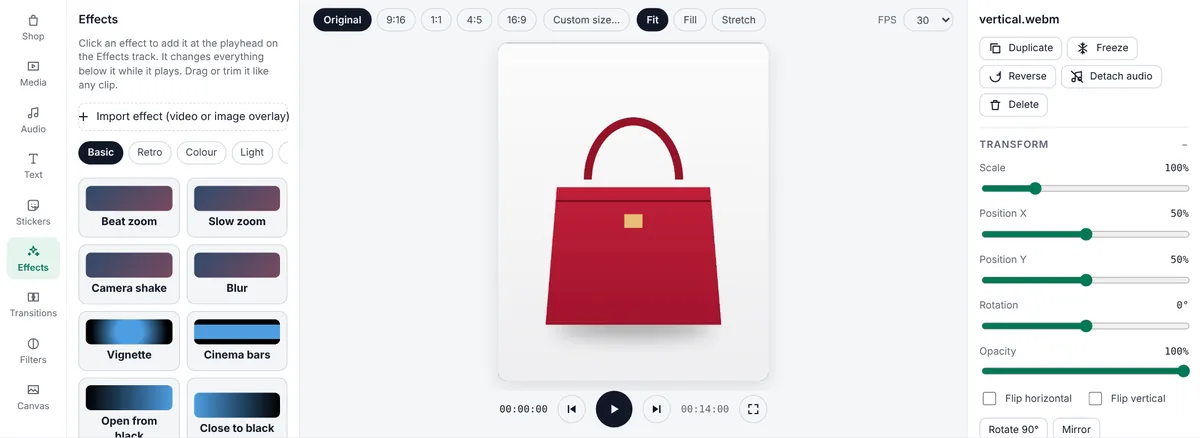
- For the reveal, add an effect from the Effects tab at that moment: Flash, Beat zoom or Sparkles work well. Effects sit on the Effects track and last 3 seconds; drag their edges to change that.
- Use Freeze on the best frame of the reveal to hold it for two seconds while viewers take it in.
- Add a short title from the Text tab ("Unboxing: Oud Noir perfume") and two or three feature stickers from Stickers → Delivery & trust, for example 100% original or a check-mark feature chip.
- End with a price tag and an Order on WhatsApp card from Stickers → Order & contact (select a sticker to type your own number).
Sound
Unboxing sounds (tape tearing, paper rustling, the box opening) are satisfying, so keep some of the original sound and lower it rather than muting it. Add soft background music on an audio track at about 20–30% volume. Sound effects from the Audio tab help too: a Pop on the reveal or a Ding on the price. If you talk while unboxing, use Voice enhancer & noise reduction in the Inspector to clean the recording.
Colour
Make the colours match the real product. In the Filters tab, the Product group has looks made for selling: True colour, Clean white and Crisp detail. Choose Whole video to apply one look to every clip so they match.
Export and post
Click Export and pick the platform: TikTok & TikTok Shop, Instagram Reels, Snapchat and WhatsApp Status use vertical 1080×1920; marketplaces and product pages are safer in square. Post the unboxing alongside your normal product video; they do different jobs. The product video sells the offer, and the unboxing proves the quality.
Mistakes to avoid
- Too long: cut every pause. Viewers leave during slow tape-cutting.
- Packaging you don't really use: show what customers will actually receive.
- Dark, yellow footage from room lights at night. Film in daylight.
- Missing the price and how to order. Always end with both.
Frequently asked questions
How long should an unboxing video be?
20–40 seconds for social media: the parcel, the reveal, the details and what is included, with pauses cut out.
Can I make an unboxing video with just a phone?
Yes. Film short clips next to a window with the phone on a stand, then cut and arrange them in Mshopi for free.
Should I keep the original sound?
Usually yes, at a lower volume, with soft music underneath. Unboxing sounds are part of the appeal.
Make your product video now
Mshopi is free, needs no account and never adds a watermark. Your photos stay on your device.