Music for product videos without copyright problems
Music makes a product video feel alive, but the wrong track can get your video muted, blocked or claimed, and in ads that can stop a campaign. Here is how copyright works for product videos in plain words, which music is safe to use, and how Mshopi makes original music for every video.
Why popular songs are risky
Popular songs are owned by labels and publishers. Platforms detect them automatically. On your personal profile a song might be allowed through the platform's licence, but business accounts and ads usually have much stricter rules, and a detected song can lead to a muted video, a blocked ad or a claim. Downloading a song from YouTube and putting it in your product video is the most common way small sellers run into trouble.
Safe music options
| Source | Good for | Watch out for |
|---|---|---|
| Mshopi generated music | Any product video, including ads | Simple, instrumental style |
| Platform music libraries (in TikTok, Instagram, Snapchat) | Trends and organic posts | Business accounts often get a smaller, commercial-only library |
| Royalty-free libraries | Specific styles | Read each licence: some require credit or forbid ads |
| Music you commissioned | Your brand sound | Get the rights in writing |
How Mshopi's music works
When you make a product video, Mshopi composes the music on your device: chords, bass, a melody and drums built from scratch with your browser's audio engine. Each video gets its own track, so it doesn't match any existing song and can't be detected as one. You may use it in videos you make with Mshopi, including ads.
Choose a mood in the maker's Music list, or keep Match the style:
- Upbeat: sales, flash deals, fast product montages.
- Happy: beauty, fashion, kids and home products.
- Calm: clean minimal videos, product pages, marketplaces.
- Luxury: perfume, jewellery, watches, bridal.
- Festive: Eid, weddings and celebrations.
- Tech: gadgets and electronics.
Want a different tune? Try the next style makes a new version with new music. Every generated track also appears in the Audio tab, so you can reuse a tune you like in other videos.
Sound effects
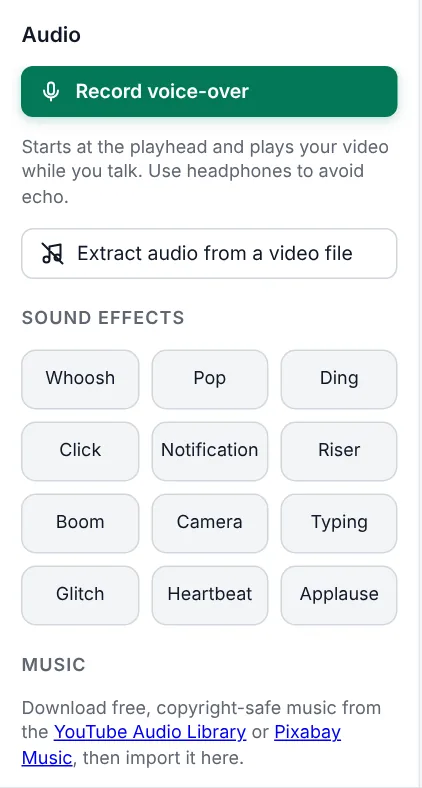
Small sounds make edits feel professional: a Whoosh on transitions, a Pop when a sticker appears, a Ding on the price, a Camera shutter on photos. The maker adds these automatically when Sound effects is ticked; in the editor you'll find 12 effects under Audio → Sound effects. They're synthesised by Mshopi, so they're free to use too.
Mixing music with voice
- Voice first: when someone speaks, select the music clip and set its Volume to 20–30%.
- Fades: set Fade in to 0.3 seconds and Fade out to 1–2 seconds so the music never starts or stops abruptly.
- Clean voice: select the voice clip and use Voice enhancer & noise reduction to remove fan hum and even out the volume.
- Check on a phone speaker: most people will hear your video through one.
Using platform sounds
If you want a trending sound on TikTok, Instagram or Snapchat, export your video from Mshopi with low or no music, then add the sound inside the app when posting, if your account type allows it. That way the platform's own licence covers it. Don't add trending songs to the file itself.
Silence is fine too
Not every product video needs music. Satisfying real sounds (fabric rustling, a perfume spray, a lid clicking shut, food sizzling) can be more engaging than a soundtrack. Keep the clip's own sound, clean it with the voice enhancer if it's noisy, and add music only quietly underneath.
Quick checklist
- No downloaded songs in the file.
- Licence checked for any library music, especially for ads.
- Music lower than voice; fades at the start and end.
- The video still makes sense on mute (prices and offers on screen).
Frequently asked questions
Can I use popular songs in my product videos?
It is risky. Songs are detected automatically, and business accounts and ads usually cannot use them, which can lead to muted or blocked videos.
Is Mshopi's music free to use in ads?
Yes. The music is generated on your device for your video, and you may use it in videos you make with Mshopi, including ads.
How loud should music be under a voice-over?
About 20–30% volume, with a short fade-in and a 1–2 second fade-out.
Make your product video now
Mshopi is free, needs no account and never adds a watermark. Your photos stay on your device.