How to add captions to product videos, including Urdu
Most people scroll social media with the sound off. If your product video explains the offer by voice only, they miss it. Captions put your words on screen, so the price, features and how to order reach everyone. Mshopi can write them automatically from your voice, including in Urdu, and you can edit every line.
When product videos need captions
Mshopi's product video maker already puts the key facts on screen: product name, price, features and contact. You need captions when someone speaks in the video, for example a demo, a review, a voice-over explaining how to use the product, or a live-style video of you showing the collection. Without captions, muted viewers see your mouth moving and scroll on.
How automatic captions work in Mshopi
Captions are made by an open speech-recognition model (Whisper) running inside your browser. Your audio never leaves your device. Mshopi mixes the sound on your timeline, turns speech into text with timings, and places each sentence as a normal text clip on a new Captions track above your video. The first use downloads the model (about 80 MB); after that it is cached. Videos up to 30 minutes are supported, though product videos are usually under a minute.
Step by step
- Add your voice. Either import a video in which you speak, or record narration over your product video: Audio → Record voice-over plays the video while you talk. Use headphones so the music doesn't leak into the microphone.
- Lower the music while generating. Background music confuses speech recognition. Mute the music track with its speaker icon, generate captions, then unmute it.
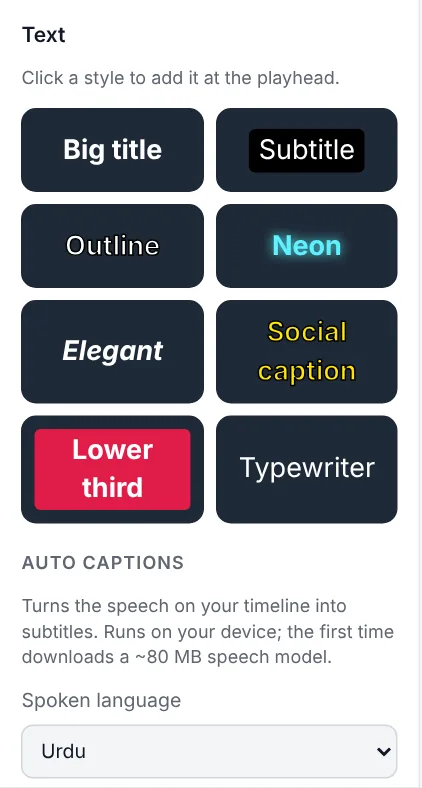
- Choose the spoken language. Open Text → Auto captions. The list includes English, Urdu, Hindi, Arabic, Punjabi, Spanish, French, German, Portuguese, Turkish, Indonesian and Russian. Choosing the language is more accurate than automatic detection.
- Click Generate captions and wait for the progress message at the top to finish.
- Check every line. Click a caption on the preview or timeline to edit its text in the Inspector. Drag its edges on the timeline to change when it appears.
Urdu, Roman Urdu and Hindi
Choosing Urdu writes captions in Urdu script; Hindi writes Devanagari. Many sellers' customers read Roman Urdu (Urdu in English letters) most easily. There is no automatic Roman Urdu option yet, but you can generate in Urdu or English to get the timings, then retype each line in Roman Urdu; the timing is the slow part, so this still saves most of the work.
Speech recognition makes mistakes with brand names, product codes, prices and mixed Urdu-English sentences. Always check numbers: a wrong price in a caption is worse than no caption.
Styling captions for selling
- Readable size: 48–64 px on a 1080-pixel-wide video. Captions come as white text on a dark box, which reads well on any background.
- Above the buttons: on TikTok, Reels, Snapchat and Status, the bottom fifth of the screen is covered by app buttons and captions. Move your captions up with Position Y (about 70–75%) so they don't clash with the price tag or the app.
- Avoid covering the product. If a caption sits over the product, move it or shorten the sentence.
- Highlight the offer: select the caption that says the price and change its colour to your brand colour, or add a price-tag sticker at the same moment.
Captions and the AI voice
If you don't want to record your own voice, the product video maker can add an AI voice that reads your offer (English videos for now). Because the AI voice is clear and consistent, captions generated from it are very accurate, so you get voice and captions with almost no correction.
Troubleshooting
- "No speech was recognised": the voice is too quiet or the music too loud. Raise the voice clip's volume or clean it with Voice enhancer & noise reduction, mute the music, and try again.
- Wrong language: choose the language manually instead of detecting it.
- Slow on a phone: speech recognition is heavy work; a computer is much faster.
Frequently asked questions
Can I add Urdu captions to a product video for free?
Yes. Choose Urdu under Text → Auto captions in Mshopi. It runs on your device, with no upload and no watermark.
Do I need captions if Mshopi already shows the price?
Only when someone speaks in the video. The product video maker already shows the name, price, features and contact as on-screen text.
Are my recordings uploaded to make captions?
No. The speech model runs inside your browser; your audio never leaves your device.
Make your product video now
Mshopi is free, needs no account and never adds a watermark. Your photos stay on your device.