TikTok Shop product video tips for small sellers
TikTok is an entertainment app where people also shop. Product videos that work there feel like content first and ads second: quick, real and clear about the price. These tips apply whether you sell through TikTok Shop (where available) or send people to your WhatsApp or store.
Hook with the result, not the logo
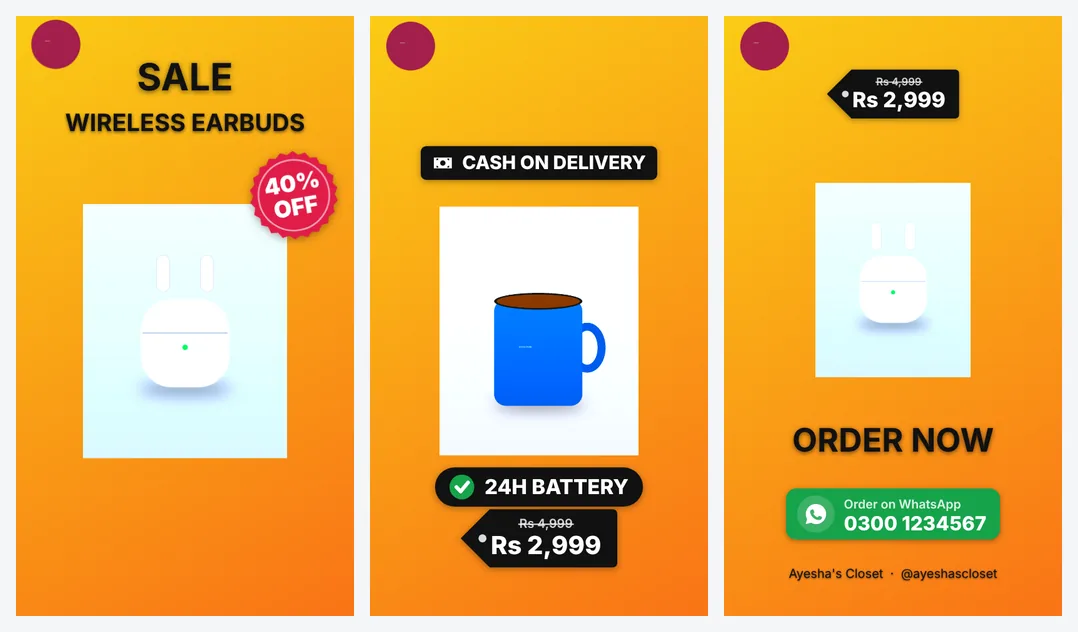
Don't start with your logo, a box or a slow fade-in. Start with what people want: the dress on, the gadget working, the finished dish, the before-and-after. Mshopi uses your first photo as the opening scene with the headline and discount, so choose your strongest image first.
Good opening lines (your headline or the first words of your caption):
- "This is the bag everyone asked about"
- "Rs 1,999 for all three"
- "Back in stock, only 10 left" (if true)
- "Eid ready in one click"
Pace: change the picture often
On TikTok, a still image for five seconds feels long. Change the shot every 1.5–3 seconds. The Flash deal style moves fastest (about 1.6 seconds per photo) with whip transitions; Bold sale and Tech are around 2.2 seconds. Mshopi also adds a slow zoom to every photo, so even still images feel alive.
Show it being used
Catalogue photos tell people what a product is; use shots make them want it. Add at least one photo or short clip of the product being worn, held, switched on or used in a room. A 3–6 second phone clip works perfectly as one scene in Mshopi.
Price, offer and trust on screen
- Price: show it, ideally with the real old price crossed out if it's on sale. Viewers who still watch after seeing the price are serious.
- One offer: the discount, a bundle or free delivery, not all three in the headline.
- Trust: cash on delivery, returns or "100% original" badges (only if true) answer doubts before they become questions.
Captions and text
Many people watch with sound off. Mshopi's videos carry the important information as on-screen text: headline, name, features, price and how to order. In your TikTok caption, repeat the product name and price in plain words so people searching TikTok can find it, and add a few relevant hashtags (product type, city, occasion).
Sound
Mshopi's music is generated for your video, so it's original and won't trigger copyright problems in the file. On TikTok you can also add a trending sound in the app when posting; lower the original music in the app if you do, so they don't clash.
End with one clear action
If you sell through TikTok Shop, tell people to tap the product link. If you take orders on WhatsApp, the end card's "Order on WhatsApp" with your number does the job; also put the number in your profile. Don't give three different ways to buy in one video.
Post consistently and test
- Post regularly: one or two product videos a day for a few weeks teaches you more than one perfect video a month.
- Make two versions of your best product with Try the next style and post them on different days.
- Reuse winners: if a video brings orders, make a new version of it next week with a different first photo.
- Read comments: questions in comments are your next video's features ("Is it washable?" → "Machine washable").
Batch your videos
Posting regularly is easier when you make videos in batches. Once a week, photograph five to ten products in one session with the same light and background. Then, in Mshopi, make one video per product: add the photos, change the name and price in the prompt and click Make. With the brand kit filled in, each video takes about a minute. Export them all, give the files clear names (product and price), and schedule them across the week. Keep your prompts in a note on your phone; next season you can update prices and remake every video in minutes.
Rules to respect
TikTok and TikTok Shop have rules about what products can be sold, how claims and discounts are shown and what counts as misleading. Keep prices, discounts and claims accurate, don't use other brands' logos, and check TikTok's current seller and advertising policies for your country.
Frequently asked questions
How long should a TikTok product video be?
Usually 10–20 seconds for a single product: a strong opening, a few quick scenes and a clear ending.
Should product videos on TikTok show the price?
Usually yes. A visible price builds trust and attracts serious buyers.
Can I make TikTok Shop videos for free?
Yes. Mshopi makes vertical product videos free with no watermark. Uploading and linking products happens in TikTok.
Make your product video now
Mshopi is free, needs no account and never adds a watermark. Your photos stay on your device.