Product video sizes for every place you sell
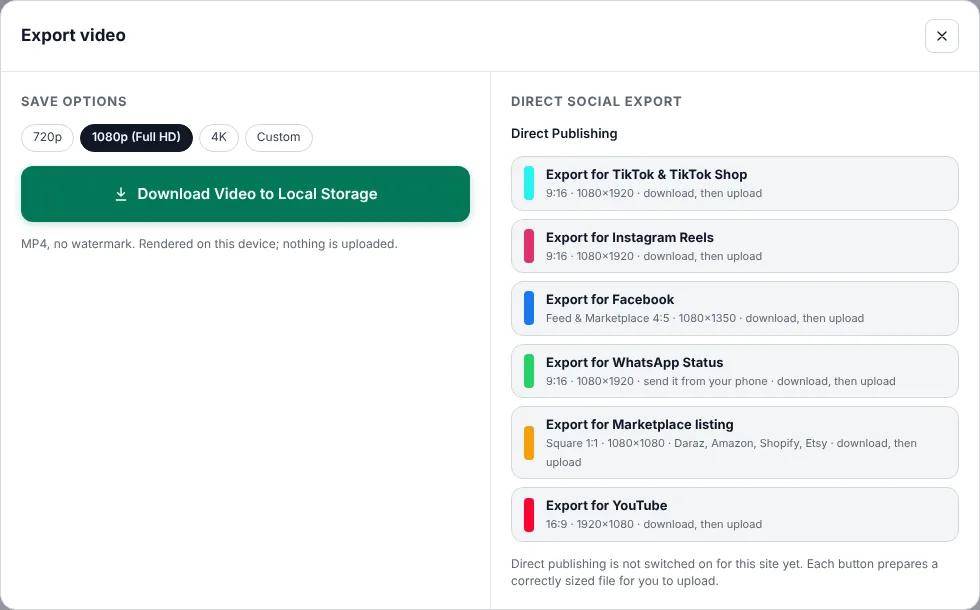
The same product video looks great on one platform and awkward on another if the shape is wrong: black bars, cut-off prices, tiny text. Here is the size to use for each place sellers post, why it matters, and how to make several versions from one project in Mshopi.
Quick reference
| Where | Shape | Pixels | Mshopi preset |
|---|---|---|---|
| TikTok and TikTok Shop | Vertical 9:16 | 1080×1920 | TikTok & TikTok Shop |
| Instagram Reels and Stories | Vertical 9:16 | 1080×1920 | Instagram Reels |
| Instagram and Facebook feed | Portrait 4:5 | 1080×1350 | |
| Facebook groups and Marketplace | Square 1:1 or 4:5 | 1080×1080 | Marketplace listing |
| WhatsApp Status | Vertical 9:16 | 1080×1920 | WhatsApp Status |
| Marketplace product video | Square 1:1 (common) | 1080×1080 | Marketplace listing |
| Online store product page | Match your photos (1:1 or 4:5) | 1080×1080 / 1080×1350 | Marketplace listing or custom |
| YouTube and websites | Landscape 16:9 | 1920×1080 | YouTube |
Platforms change their recommendations from time to time, and marketplaces set their own video rules. Treat this as a reliable starting point and check the platform's current help page for limits on length and file size.
Why vertical wins on phones
Most people shop on their phones, holding them upright. A vertical 9:16 video fills the whole screen; a landscape video uses about a third of it. That's why TikTok, Reels, Shorts and Status are all vertical, and why Mshopi's maker starts in Vertical 9:16.
Square and 4:5 for feeds and listings
In feeds, Instagram and Facebook show portrait 4:5 videos larger than square ones, so 4:5 gets more attention while scrolling. Square 1:1 is the safe choice for places where you don't know how the video will be cropped: groups, Marketplace, many marketplaces and online store galleries that use square product photos.
Safe areas: keep prices visible
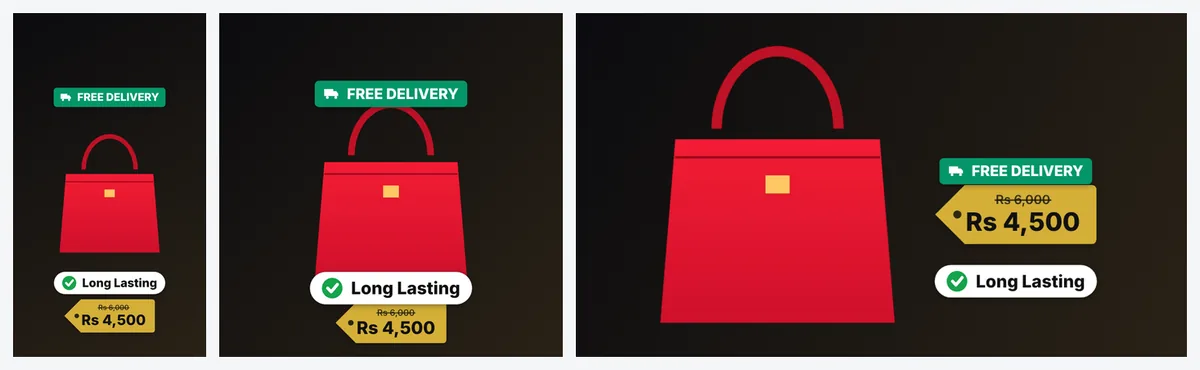
On vertical platforms, the app puts buttons, captions and your name over the video: along the bottom (roughly the bottom fifth) and down the right edge. Anything important placed there may be covered. Mshopi's vertical layouts keep the headline in the top area, the product in the middle and the price and features above the bottom zone. When you move stickers yourself, keep prices and phone numbers away from the very bottom and the right edge.
Making several versions from one project
- Make the video in the size for your most important platform.
- Export it with that platform's preset.
- Change the canvas with the buttons above the preview (9:16, 1:1, 4:5, 16:9). Photos keep their framing; check text and stickers and drag any that sit too close to an edge.
- Export again with the next preset.
Or simply open the maker again, choose another size and click Make my video. The layout is rebuilt for that shape, so it often looks better than resizing. Your photos and prompt stay in the maker until you close the page.
How long should each version be?
Shape is only half the story; length matters too. Short-form platforms (TikTok, Reels, Shorts, Status) work best with product videos of about 10–20 seconds, enough for a hook, a few details and the order card. Feed videos on Facebook and Instagram can be a little longer if every scene shows something new. Product page and marketplace videos should be short and calm: 10–30 seconds showing the product from several angles. Mshopi's maker builds about 2–3 seconds per photo plus a 3-second end card, so the number of photos you add sets the length. To make a version shorter, remove a photo in the maker or delete a scene on the timeline with Shift+Delete, which closes the gap.
Resolution and file size
Export at 1080p for social media; platforms compress uploads anyway, and 4K files are much bigger without visible benefit on phones. Use 720p if you're sending videos over a slow connection or to customers on WhatsApp. Mshopi exports MP4 files that play on every phone and platform.
Product photos for videos
Your photos don't have to match the video shape. Mshopi fits each photo inside the frame on a background that matches the style, or fills the frame when the shapes are close. For the cleanest look, remove the backgrounds; cut-out products sit nicely on any background in any shape. See how to remove backgrounds for free.
Frequently asked questions
What size should a product video be for TikTok Shop?
Vertical 9:16 at 1080×1920 pixels.
What is the best size for Instagram and Facebook feed videos?
Portrait 4:5 at 1080×1350, which shows larger in the feed than square.
What size works on most marketplaces?
Square 1:1 at 1080×1080 is the safest common choice, but check each marketplace's current rules.
Make your product video now
Mshopi is free, needs no account and never adds a watermark. Your photos stay on your device.