WhatsApp Status marketing for small shops
For millions of small businesses, WhatsApp is the shop window, the counter and the delivery desk. Your Status is seen by the people who already have your number, and they are the most likely to buy. Used well, it brings orders every day. Here's a simple routine that works.
Why Status works
People who saved your number chose to hear from you, and Status sits right next to their chats. There's no algorithm deciding who sees it: if a customer has your number saved and you have theirs, they can see your updates. It costs nothing, and replying takes one tap. The challenge is attention: people tap through Statuses fast, so each update needs to be clear in a second.
Set up the basics first
- WhatsApp Business app: free, and gives you a business profile, catalogue, quick replies, labels and an away message.
- Profile: your logo as the picture, shop name, short description, hours, address or "online only", and website or Instagram if you have them.
- Catalogue: add your main products with photos and prices, so people can browse after seeing your Status. Use Mshopi's listing image maker for clean catalogue photos.
- Ask customers to save your number. They only see your Status if they've saved it. Put "Save our number to see new arrivals" on your packaging, receipts and other social pages.
A simple daily routine
| When | Post | Mshopi style |
|---|---|---|
| Morning | New arrival or product of the day | Clean minimal, Fresh pastel or Beauty & fashion |
| Afternoon | Proof: a customer's photo (with permission), a delivery being packed, a close-up of quality | Photos or a short clip, no video needed |
| Evening | An offer: today's deal, limited stock or a bundle | Flash deal or Bold sale |
Three to five good updates a day is plenty. Posting twenty in a row makes people skip all of them. Space them out so you appear several times a day near the top of their Status list.
Making Status videos with Mshopi
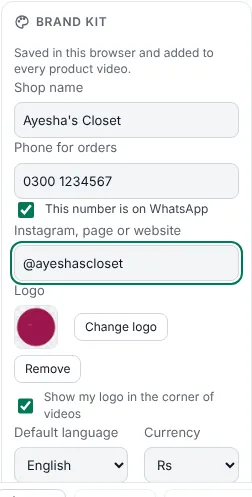
- Fill in the brand kit in the Shop tab: shop name, WhatsApp number (tick "This number is on WhatsApp") and logo.
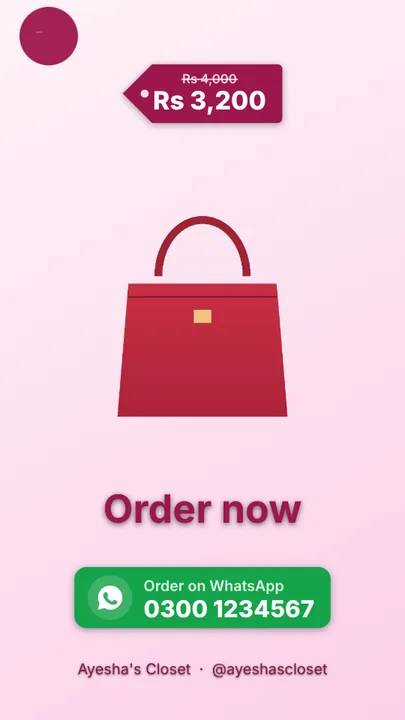
- Click Product video from photos, add 3–5 photos and type the offer, e.g. "Kurti, Rs 1,800, 3 colours, cash on delivery". Your number comes from the brand kit automatically.
- Keep Vertical 9:16. The end card shows "Order on WhatsApp" with your number.
- Export → WhatsApp Status. Send the file to your phone and post it as your Status.
WhatsApp limits the length of each Status video, so keep product videos short (10–30 seconds). Mshopi's videos are usually 10–16 seconds.
Turning views into orders
- Always show the price. "Price in DM" creates work for you and loses buyers who don't want to ask.
- One product per video, so the reply "I want this" is clear.
- Reply within minutes if you can. Set up quick replies in WhatsApp Business for your price list, delivery charges and payment details.
- Label chats (new order, paid, delivered) so nobody is forgotten.
- Follow up once with people who asked but didn't order: "Still interested? Two pieces left." Once, not every day.
Respect your customers (and WhatsApp's rules)
Status is safe because people choose to look at it. Direct messages are different. Only message people who have agreed to hear from you, keep broadcast messages useful and occasional, and stop when someone asks. WhatsApp can limit or ban business numbers that many people block or report. Never add people to groups without asking.
Measure what works
Your Status shows who viewed each update. Once a week, note which posts got the most views and, more importantly, the most messages and orders. You'll quickly learn which products, prices, styles and times work for your customers. Then make more of those.
Frequently asked questions
How often should a shop post on WhatsApp Status?
Three to five good updates a day, spread out, usually works better than many updates at once.
Who can see my WhatsApp Status?
People who have saved your number, if you have saved theirs, depending on your Status privacy settings.
How long can a WhatsApp Status video be?
WhatsApp limits each Status video's length and splits or trims longer videos. Keep product videos to 10–30 seconds.
Make your product video now
Mshopi is free, needs no account and never adds a watermark. Your photos stay on your device.