Clothing try-on Reels for boutiques and fashion sellers
For clothing, seeing it worn beats any flat photo. Try-on videos show fit, length, movement and how colours look on a real person, which answers the questions that stop people from ordering. Here is how boutiques and home fashion sellers can film and edit try-on Reels and TikToks with a phone and Mshopi.
What buyers want to see
- Fit: how it sits on the shoulders, waist and hips.
- Length: where the shirt, kurta or dress ends, and the trouser length.
- Movement: how the fabric falls and flows when walking or turning.
- True colour in daylight.
- Details: embroidery, prints, buttons, lace, the dupatta.
Plan your shots to answer these: a full-length front view, a turn, a walk towards the camera, and close-ups.
Filming setup
- Vertical, full length: phone on a tripod at chest height, far enough to show head to toe.
- Daylight facing the model, from a window or outdoors in shade.
- Plain wall or a tidy room. Remove clutter; it distracts from the clothes.
- Same position for every outfit so the outfit changes look like magic.
- Start and end each clip with the same pose (hand covering the lens, a jump, a turn). That's how the classic outfit-change transition works.
- Mention the model's height and the size worn, which helps buyers choose their size.
Editing on the beat
- Choose Edit my own video, import the clips and a music track (in the Audio tab, your previously generated Mshopi music appears in the library; or import a track you have the rights to use).
- Put the music on an audio track first. Play it and watch where the beats fall in the timeline.
- Add the outfit clips in order on Video 1. Trim each clip (drag its edges, or split with S) so each outfit change lands on a beat. 1–2 seconds per outfit feels energetic.
- Between outfits, add a quick transition: Flash, Zoom in, Whip pan left or Spin from the Transitions tab, at 0.2–0.4 seconds.
Speed for drama
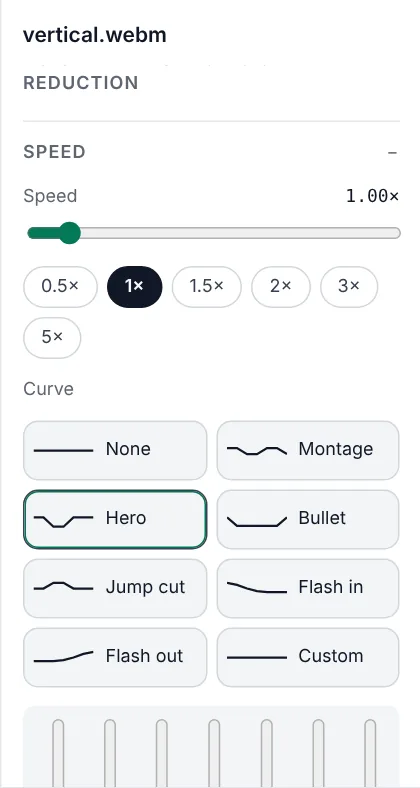
Select the clip of your hero outfit and open Speed in the Inspector. The Hero curve speeds up, slows dramatically for the turn or the dupatta flowing, then speeds up again. Flash in opens a clip fast and settles into normal speed, which is great for the first outfit. Speed changes need footage with enough frames; filming at 60 fps makes slow sections smoother.
Information that sells
Use stickers so viewers get the facts without sound:
- Feature chips (Stickers → Delivery & trust, the check-mark chips): fabric ("Pure lawn"), size range ("S to XL"), "Model is 5'5" wearing M".
- Price tag (Stickers → Price tags): type
Rs 2,500|Rs 3,500to cross out the old price. - Colour names as small text under each outfit when you show several colours of one design.
- How to order: the Order on WhatsApp or DM to order card at the end.
Fast option: photos of each outfit
If you have model photos rather than video, the product video maker builds a try-on style video in seconds. Choose the Beauty & fashion style for a soft, elegant look, or Flash deal for a fast sale video. Each photo gets a slow zoom, so the video still feels alive.
Several colours of one design
When a design comes in several colours, film each colour the same way and cut between them on the beat. Add the colour name as a small text label on each clip and finish with all colours laid out together. Viewers can choose a colour without messaging you, and you get fewer "which colours do you have?" questions.
Colour accuracy
Clothes returned because "the colour looked different" cost you twice. Use the True colour or Fabric filter from the Product group rather than strong stylised looks, and film in daylight.
Export
Export vertical 1080×1920 for Instagram Reels, TikTok, Snapchat and WhatsApp Status. Keep price tags and text above the bottom fifth of the screen, where app buttons sit.
Frequently asked questions
How long should a clothing try-on Reel be?
10–25 seconds: about 1–2 seconds per outfit plus a short ending with the price and how to order.
How do I make outfit changes match the beat?
Place the music first, then trim each outfit clip so the change lands on a beat you can see in the timeline.
Which filter keeps clothing colours accurate?
True colour or Fabric in the Product group, used on footage filmed in daylight.
Make your product video now
Mshopi is free, needs no account and never adds a watermark. Your photos stay on your device.